
SHYFT
A mobile time tracking and scheduling application for non-traditional workers, enabling shift submission, time-off requests, and shift swapping without management intervention.
Client
Platform
Timeline
4 Months
Design Synthesis
Project Overview
Objective
SHYFT was my thesis project during my final year at the University of Colorado Denver. The goal was to create a mobile time tracking and scheduling application for non-traditional workers (those that don’t work the standard 9 to 5, Monday to Friday) that would allow users to submit schedules, request time off, and switch shifts directly without the need for management and traditional paper schedules. The app would create transparency for all employees and management on who is covering which times and how often they are working.
Team
| # | Role | Description |
|---|---|---|
| 1 | UX Designer (Me) | Sole designer responsible for research, synthesis, design, prototyping, and testing for the thesis project. |
My Mandate
| Directive | Description |
|---|---|
| Reduce Manager Burden | Take a lot of the scheduling work out of managers’ hands and place it directly in the hands of employees. |
| Centralize Availability | Allow staff to submit availability in a single location by a certain day, instead of phone calls, texts, and written notes. |
| Automate Where Possible | Provide managers a way to have hours and availability automatically put into the schedule, with the app smart enough to automatically disperse hours and allow manual overrides. |
Coming from a retail management background, I knew the struggle with scheduling a group of non-traditional employees and wanted to create a mobile application that would address the pain points I had experienced firsthand.
Discovery
Initial Insights
| Method | Participants | Core Insight |
|---|---|---|
| Survey | ~70 servers, bartenders, and managers | Sent out to Oskar Blues restaurants to find out what users liked and didn’t like about the current scheduling system (which was still done by hand on paper). |
| User Feedback | Mixed roles across multiple locations | Nobody, no matter what their role, enjoyed the current system. It was time-consuming and irritating for managers and frustrating for staff. |
| Context | Multiple Oskar Blues restaurants | Oskar Blues allowed me to use their multiple restaurants to gather a large group of users to research and test with. |
The feedback confirmed my suspicion that the paper-based system was broken. It was time-consuming for the manager who had to make the schedule, as they would be gathering availability on an often weekly basis and trying to divide an often changing max number of hours across the week. The servers and bartenders didn’t like it, as often times the manager would miss new availability changes because there was no central way to submit them—it was all done by phone calls, texts, written notes, etc.
Problems Identified
MANAGER OVERHEAD
NO CENTRAL SUBMISSION
PAPER SCHEDULES
"The amount of time I spend dealing with schedules and constnatly changing availability of these kids (servers and bartenders) every f***ing week is insane."
— Shift Manager, Oskar Blues
Proposed Solution
This meant I had to design a mobile app that would allow staff to submit availability in a single location by a certain day, and provide managers a way to have hours and availability automatically put into the schedule, ideally having the app be smart enough to automatically disperse hours with the ability for manual overrides.
Design
Research
| Method | Description |
|---|---|
| User Interviews | Conducted interviews with servers, bartenders, and managers to understand workflows and pain points. |
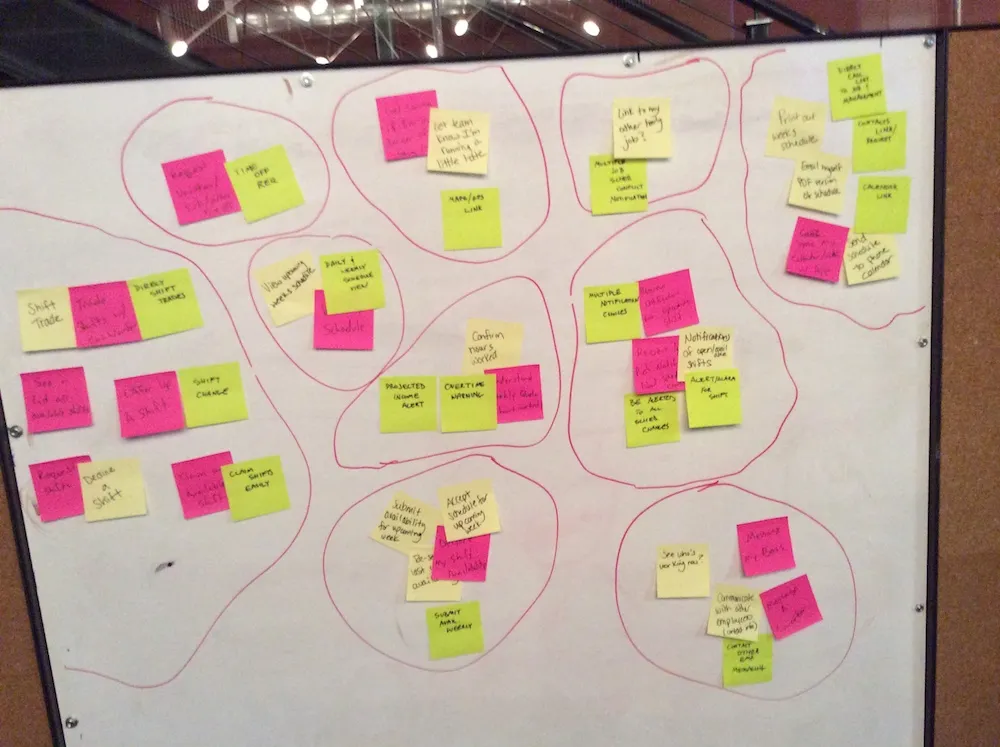
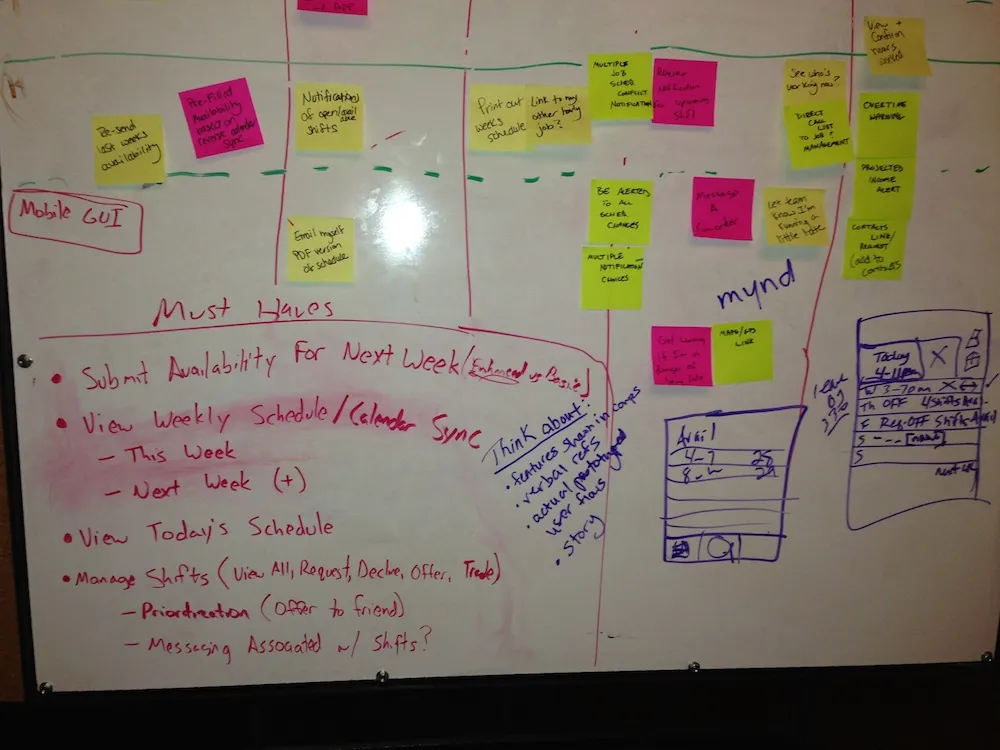
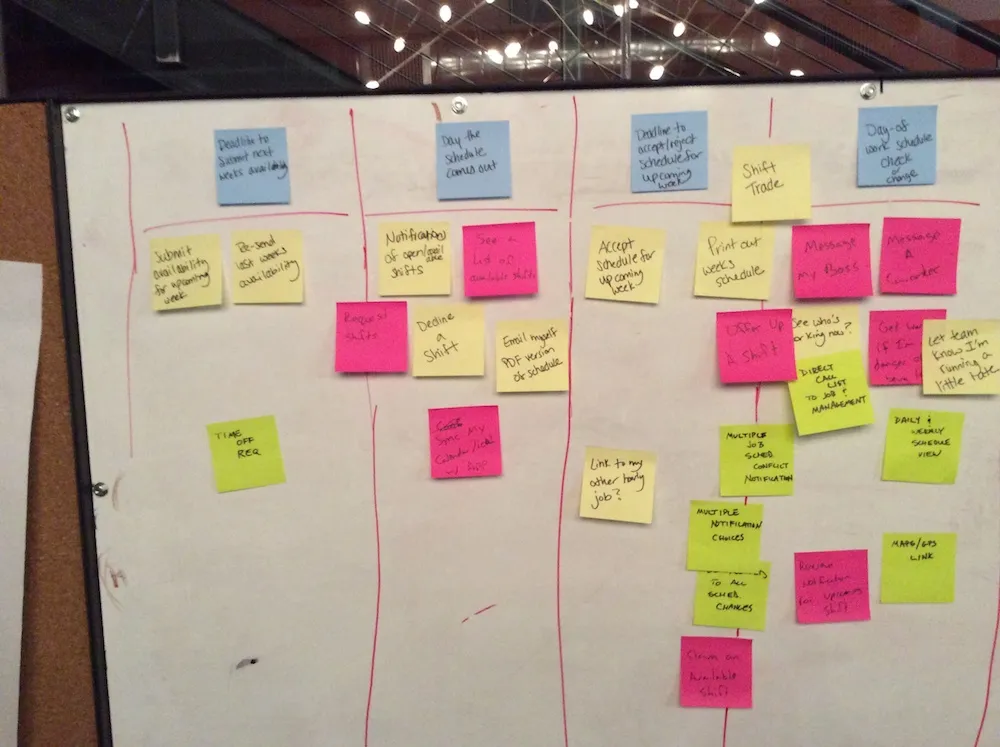
| Design Exercises | Whiteboarding, group talking sessions, and comparative analysis to explore solutions. |
Conceptual Framework
| Method | Description |
|---|---|
| Content Strategy | Defined the content and messaging needed for the app. |
| Workflows | Mapped out the flows for submitting availability, requesting time off, and swapping shifts. |
| Information Architecture | Structured the app so users could navigate between their schedule, availability, and shift swap features. |
| Clickable Prototypes | Built prototypes for testing with users. |
| Time-on-Task Analysis | Measured how long key tasks took in the current system vs. the proposed app. |
Prototyping
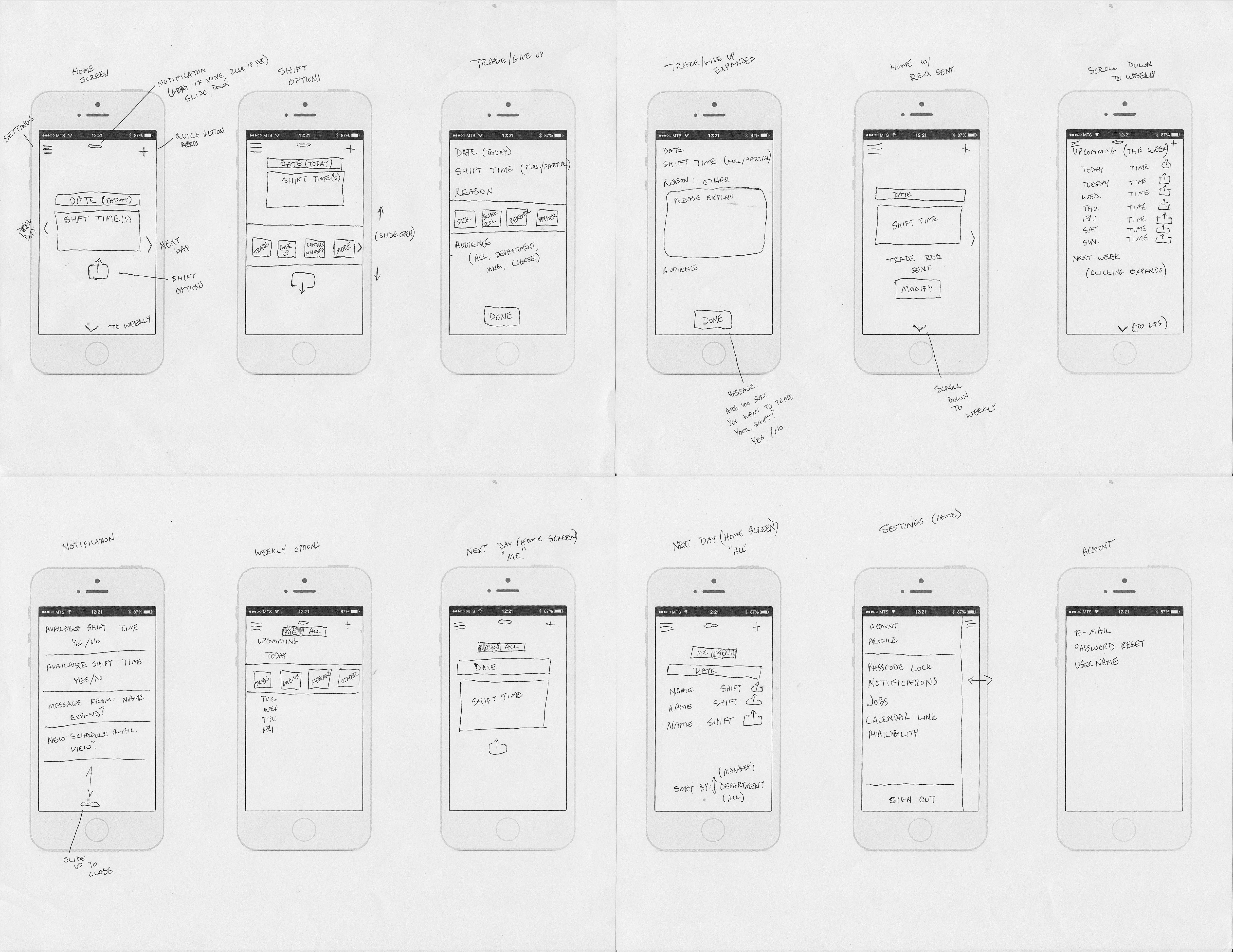
The initial pass was hand-drawn sketches of how the screens could be laid out. Knowing I was on a strict deadline, the choice was made to focus solely on the servers and bartenders for submitting time and managing their switching of shifts. I opted for this as it would provide the most feedback from users and impact a larger portion of the user base.
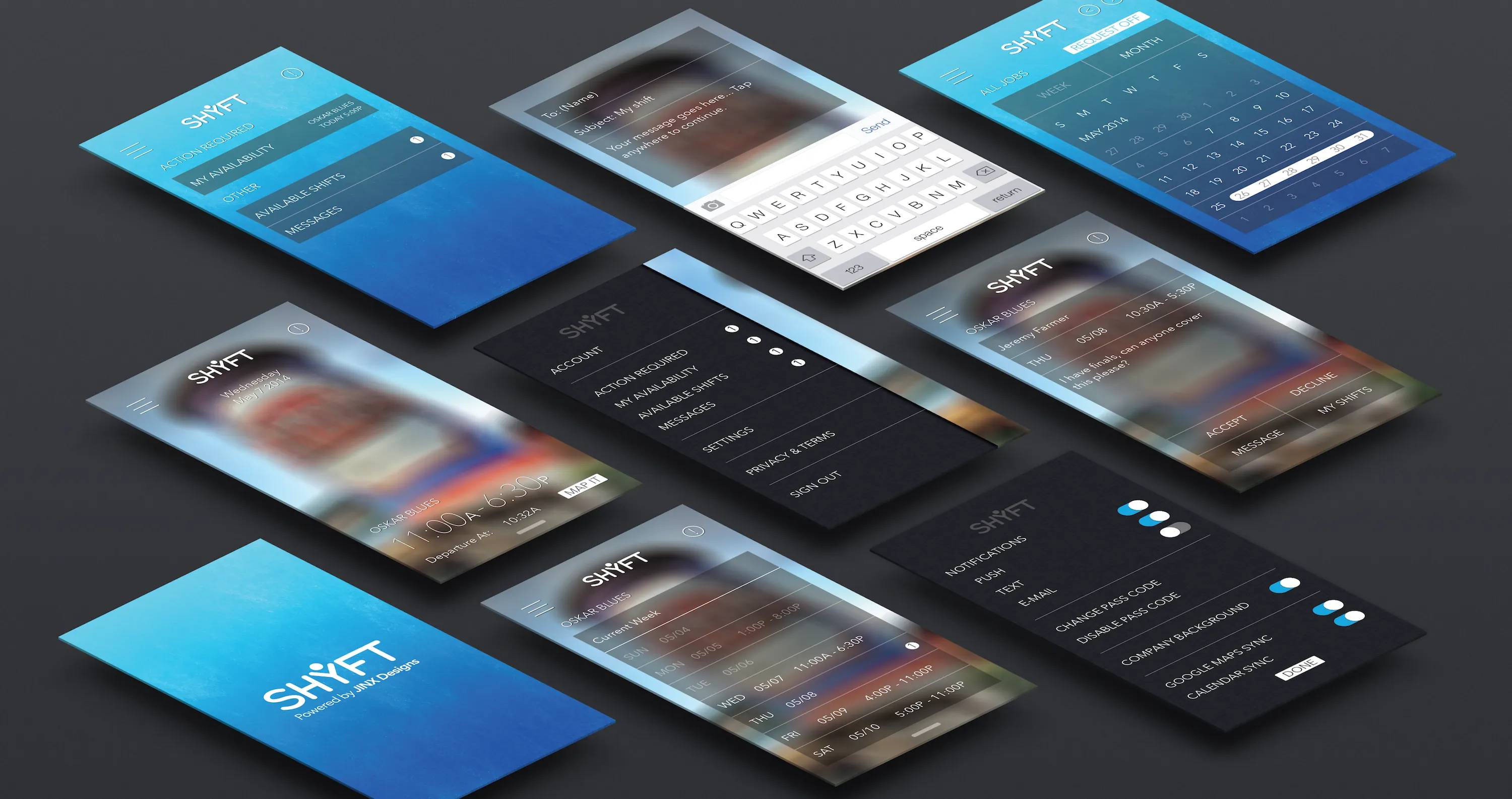
As the design continued, I moved to Illustrator (Sketch, Adobe XD, and Figma were still awhile off from hitting the UX scene) and began creating higher-fidelity mockups so that they could be put into a clickable prototype using Marvel, which was essentially the precursor to InVision. This allowed me to test with the users and gain feedback.
Testing
Evaluation
Testing was conducted with a large group of employees who had taken the initial survey. It became clear that employees wanted a way to shift between multiple jobs, as many of them would work at several of the different restaurants, and would want a way to see each schedule independently, as well as combined in a single view. They also found the ability to put their shifts up for grabs automatically on the app—vs. having to call or text multiple people—to be incredibly beneficial.
Iteration
Using the data from the follow-up survey and notes taken from the user testing, I made changes to the screens, showing multiple restaurants and focusing more on their ability to change shifts. This led to the final design that was presented at the thesis show.
Validation
Impact & Outcomes
The final design was validated through surveys and user testing with the Oskar Blues employee group. The thesis was presented at the thesis show, and the following metrics were captured from participants.
4.5 / 5
Ease of Use
4 / 5
Increased Productivity
4.5 / 5
Overall Satisfaction
5 / 5
Process Improvement
| Metric | Description |
|---|---|
| Ease of Use | 4.5 / 5 from participants evaluating how intuitive the app was to use. |
| Increased Productivity | 4 / 5 from participants on whether the app would make them more productive. |
| Overall Satisfaction | 4.5 / 5 from participants on their overall satisfaction with the proposed solution. |
| Process Improvement | 5 / 5 from participants on whether the app would improve the scheduling process compared to paper. |
Reflection
Personal Growth
SHYFT was my thesis project and the culmination of my graduate work at the University of Colorado Denver. It was rewarding to take a problem I had lived as a manager—scheduling non-traditional workers on paper—and turn it into a researched, designed, and tested mobile solution. I learned how to run surveys and user testing at scale (with Oskar Blues’ support), how to synthesize research into workflows and information architecture, and how to iterate from hand-drawn sketches to a clickable prototype and finally to a design presented at the thesis show. The project reinforced the value of putting the user at the center of the process and of partnering with real organizations to validate ideas in the field.